Ask Your Tesla — AI Assistant
Ask Your Tesla
— AI Assistant
Identified a critical gap between Tesla's AI-powered vehicle and its outdated app experience through independent UX research. Designed a conversational AI Assistant concept using Tesla's modern UI interface, grounded in real user feedback, demonstrating how strategic product thinking can transform manual friction into intelligent, proactive experiences.
Title
Ask Your Tesla — AI Assistant
Industry
UX/UI & Product Design
Date
April 2026
April 2026
Introduction
Tesla builds one of the most AI-advanced vehicles on the road, yet the app owners use daily has not kept pace with that intelligence. Being around Tesla owners and their frustrations, I observed a consistent pattern: users were struggling with friction that seemed unnecessary for a brand known for innovation. This personal observation sparked a question: why hasn't AI made it into the app experience? I conducted independent research and design work to explore what a Tesla AI Assistant could look like, not as a speculative exercise, but grounded in real user pain points and strategic product thinking.
Defining the Problem
Tesla owners manage busy lives, and the app adds friction where there should be none. Tasks require too many steps, features are unreliable, and support is unclear when issues arise. For a product central to the Tesla ownership experience, this gap represents both a user frustration and a missed opportunity.
Tesla owners manage busy lives, and the app adds friction where there should be none. Tasks require too many steps, features are unreliable, and support is unclear when issues arise. For a product central to the Tesla ownership experience, this gap represents both a user frustration and a missed opportunity.


Research & Discovery
I conducted independent research analyzing App Store and Google Play reviews, Reddit discussions, Tesla community forums, and Trustpilot feedback. I used Claude and Google Gemini to structure findings and identify patterns across thousands of data points, ensuring conclusions came only from consistent, multi-source evidence.
Key user feedback revealed the core problems:
"I hate hitting tiny words on a touchscreen" revealed interaction friction on small mobile targets
"A square button is all you need" showed demand for simplicity over feature complexity
"Your finger miss and the icon disappears" indicated poor error recovery and forgiveness in the current design
"Text messaging is more reliable than voice" demonstrated user preference for conversational, text-based interfaces over voice commands
Competitive analysis of BMW, Rivian, Mercedes, and Hyundai confirmed no competitor currently offers a conversational AI assistant in their companion app. This represented a genuine market gap. I also explored visual identity directions using AI tools to develop a recognizable assistant presence within the interface.
Research & Discovery
I conducted independent research analyzing App Store and Google Play reviews, Reddit discussions, Tesla community forums, and Trustpilot feedback. I used Claude and Google Gemini to structure findings and identify patterns across thousands of data points, ensuring conclusions came only from consistent, multi-source evidence.
Key user feedback revealed the core problems:
"I hate hitting tiny words on a touchscreen" revealed interaction friction on small mobile targets
"A square button is all you need" showed demand for simplicity over feature complexity
"Your finger miss and the icon disappears" indicated poor error recovery and forgiveness in the current design
"Text messaging is more reliable than voice" demonstrated user preference for conversational, text-based interfaces over voice commands
Competitive analysis of BMW, Rivian, Mercedes, and Hyundai confirmed no competitor currently offers a conversational AI assistant in their companion app. This represented a genuine market gap. I also explored visual identity directions using AI tools to develop a recognizable assistant presence within the interface.
Ideation & Design Process
I mapped current versus proposed experiences side-by-side in Miro. The "Without AI" journey visualized the high-friction reality where users navigate deep menu layers for basic tasks, creating cognitive overload. The "With AI" journey illustrated how a conversational intermediary flattens the hierarchy, enabling users to express intent naturally and receive immediate action.
I mapped current versus proposed experiences side-by-side in Miro. The "Without AI" journey visualized the high-friction reality where users navigate deep menu layers for basic tasks, creating cognitive overload. The "With AI" journey illustrated how a conversational intermediary flattens the hierarchy, enabling users to express intent naturally and receive immediate action.


Ideation & Design Process Part 2
This comparative visualization highlighted how replacing a multi-step manual process with intelligent conversation eliminates friction and transforms the app from a static control panel into a proactive assistant.


Ideation & Design Process Part 2
This comparative visualization highlighted how replacing a multi-step manual process with intelligent conversation eliminates friction and transforms the app from a static control panel into a proactive assistant.





Prototyping & Testing
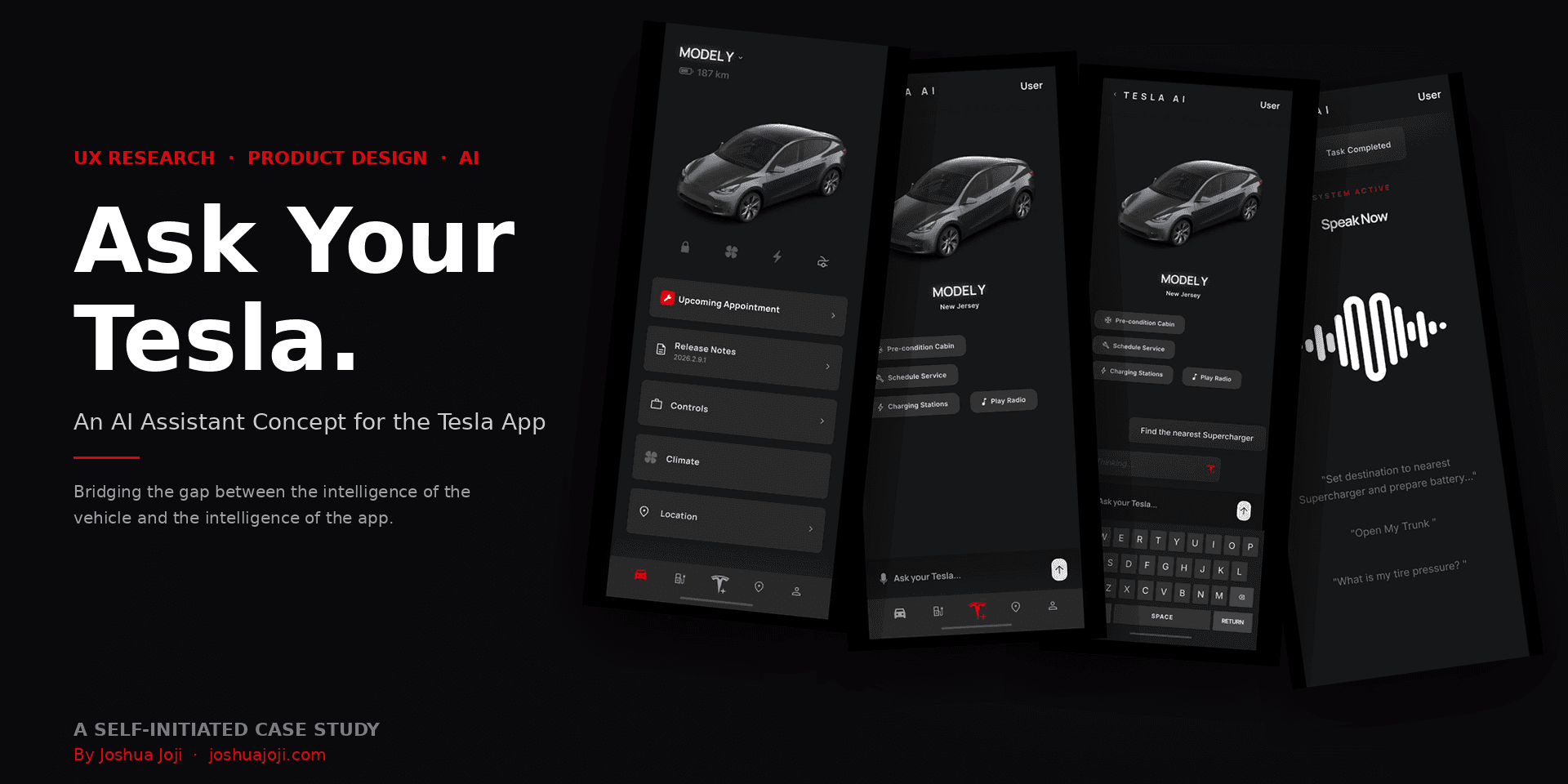
I created an interactive prototype in Figma demonstrating the full Tesla AI Assistant experience centered on a persistent conversational interface accessible from the app's bottom navigation bar.
Design implementation included:
Developed a distinctive Tesla AI logo using Claude and Google Gemini as visual references, creating an icon that felt modern , trustworthy, and resembles an actual AI chatbot while maintaining Tesla's design language
AI Assistant button positioned as centerpiece of bottom navigation system, flanking core features like vehicle controls and charging
Chat-based input interface allowing natural language requests with clean message display and visual hierarchy
Voice assistant screen with animated audio visualizer providing real-time feedback that the system is actively listening
Micro-interactions demonstrating system feedback for active listening, message confirmation, task completion, and error recovery
Dark interface with strategic color accents for critical actions and primary interactions matching Tesla's aesthetic
Progressive disclosure surfacing assistant capabilities without overwhelming the interface
I created an interactive prototype in Figma demonstrating the full Tesla AI Assistant experience centered on a persistent conversational interface accessible from the app's bottom navigation bar.
Design implementation included:
Developed a distinctive Tesla AI logo using Claude and Google Gemini as visual references, creating an icon that felt modern , trustworthy, and resembles an actual AI chatbot while maintaining Tesla's design language
AI Assistant button positioned as centerpiece of bottom navigation system, flanking core features like vehicle controls and charging
Chat-based input interface allowing natural language requests with clean message display and visual hierarchy
Voice assistant screen with animated audio visualizer providing real-time feedback that the system is actively listening
Micro-interactions demonstrating system feedback for active listening, message confirmation, task completion, and error recovery
Dark interface with strategic color accents for critical actions and primary interactions matching Tesla's aesthetic
Progressive disclosure surfacing assistant capabilities without overwhelming the interface


Final Solution & Reflection
The Tesla AI Assistant is a persistent conversational interface accessible from the centre of the navigation bar. Owners type or speak what they need and it is handled instantly. No menus, no unnecessary steps. While I did not build a fully functional product, I demonstrated through research, design, and real user scenarios that the concept is viable and the problem is real.
This project taught me how to leverage modern AI advancements and implement them into an existing product in a way that creates real value for everyday users. Every screen I designed traces back to something a real user said. Research first, design second is the standard I hold myself to and what I bring to every company I work with.
The Tesla AI Assistant is a persistent conversational interface accessible from the centre of the navigation bar. Owners type or speak what they need and it is handled instantly. No menus, no unnecessary steps. While I did not build a fully functional product, I demonstrated through research, design, and real user scenarios that the concept is viable and the problem is real.
This project taught me how to leverage modern AI advancements and implement them into an existing product in a way that creates real value for everyday users. Every screen I designed traces back to something a real user said. Research first, design second is the standard I hold myself to and what I bring to every company I work with.
Introduction
Tesla builds one of the most AI-forward vehicles on the road — yet the app owners use every day has not kept pace with that intelligence. Being around Tesla owners, including my own family, I watched firsthand how much friction people experience doing tasks that should take seconds. That observation led me to one question: why hasn't AI made it into the app yet? I set out to design what a Tesla AI Assistant could look like, built entirely on real user research and deliberate design decisions.
See the AI Assistant in Action
Watch the high-fidelity walkthrough to see how proactive quick actions and real-time voice states streamline the Tesla user experience
See the AI Assistant in Action
Watch the high-fidelity walkthrough to see how proactive quick actions and real-time voice states streamline the Tesla user experience
Projects
Explore more like this one
Explore more like this one


Selected projects that reflect my approach to design, development, and execution.